Severity at a glance
A red bar for critical, orange for high. The CVE IDs sit under the title.
Click Add to Slack, pick a channel and click Allow. From then on, every new advisory from 34 vendors that is critical, in CISA KEV or known to be exploited posts there, with the CVSS score, the fixed versions and a link to the vendor's advisory.
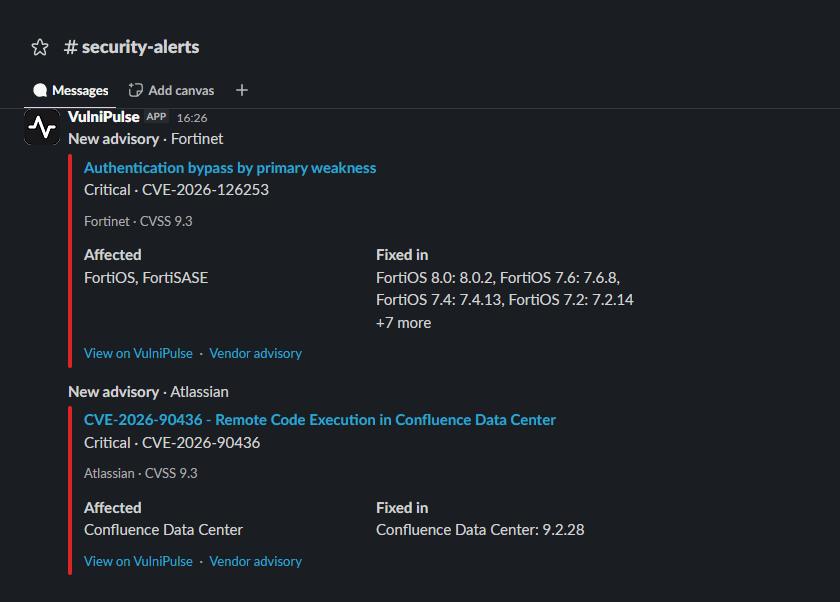
Each post
Whoever reads the channel can see what's affected and what to upgrade to, then open the vendor's advisory to confirm.
A red bar for critical, orange for high. The CVE IDs sit under the title.
The vendor, the CVSS score, and whether it's in CISA KEV or known to be exploited.
The affected products and the first fixed releases, when the vendor lists them.
One to the VulniPulse page for the advisory, one to the vendor's own advisory.
Setup
Slack is under “Slack, Discord, Teams and webhooks”. It comes with Pro and with the free month.
Slack opens its own page. Pick the channel, public or private, and click Allow.
VulniPulse posts a short test to the channel and lists it on your account page. Real alerts follow as advisories come in.
Pro · US$15 a month
Team · US$49 a month
Sources
Each post comes from the vendor's own advisory feed and CISA's KEV catalogue, and links back to the vendor. Check your exact version against the vendor's advisory before you change anything. How the matching works.
Every new advisory from the 34 vendors that is critical, listed in CISA KEV, or known to be exploited. High and medium advisories without exploitation don't post to Slack; use email or app alerts with your own rules for those. If an advisory is added to CISA KEV later, a second post says "Now known exploited".
Not on Pro: each Slack channel gets every critical, KEV and exploited advisory. For alerts about specific vendors or products, use email or app rules. On the Team plan, owners route shared team rules to channels by rule and severity.
Not usually. If your workspace requires approval for new apps, Slack sends the request to an admin and you add the channel once it's approved.
Yes, if you're a member of it. Slack's channel picker lists the channels you can post to.
The channel's webhook address, the channel name and the workspace name. Slack also returns an access token, which VulniPulse doesn't store. Removing the channel on your account page deletes all three.
Delete the channel on your account page and posts stop. To remove the app from your workspace as well, remove VulniPulse in Slack's app settings. If Slack rejects 15 posts in a row, VulniPulse switches the channel off and marks it in red on your account page.
Details of what's stored are in the privacy notice.
Included with Pro. The first month is free, then US$15 a month on the web.
VulniPulse is independent and is not affiliated with or endorsed by Slack.
Cookie settings
VulniPulse uses Google Ads measurement to understand visits from advertisements and campaign performance. It runs cookie-free until you choose. Accepting enables cookies for more accurate attribution. Rejecting keeps it cookie-free and does not limit the site.
See exactly what is measured